Project Context
Built for a lifestyle‑brand launch (Cocolili, Jan 2025) to welcome new subscribers and drive first‑time engagement.
Role
Designed the Figma layout, wrote copy, set up Mailchimp automation, and monitored GA4 click events.
Key Learnings & Next Steps
- Timing: Immediate send lifted open rates by +12%; consider testing 5‑minute vs. instant trigger.
- Scannable Copy: Short paragraphs outperformed long intros by 20% in CTR.
- CTA Testing: “Explore Our Story” beat “Start Shopping” by +15%; next step, test a “Get 10% Off” incentive.
- Tools Used: Mailchimp · Campaign Monitor · GA4 · Figma
Why Your Welcome Email Is Everything
A welcome email is more than a hello, it’s your brand’s first impression in someone’s inbox. This moment is your best shot at building a relationship, introducing your tone, and nudging the user toward their next step (subscribe, explore, or shop).
Stats You Should Know:
- Welcome emails generate 4x higher open rates than any other email type
- Users are most engaged within the first 48 hours of signing up






What Makes a Great Welcome Email?
1. Timing Is Critical
Send it immediately after sign-up. A delay of even 30 minutes reduces engagement. Use your automation tool’s trigger settings to make it instant.
2. Set Expectations
Tell them what they’ll receive in your emails—product drops, tips, stories, or exclusive offers. This builds trust early.
3. Introduce Your Brand Story
Use warm, conversational copy and a hero image that captures your brand tone. Let the reader know why your brand exists and how you help them.
4. Give Them Something to Do
Whether it’s reading your blog, following you on Instagram, or checking your bestsellers, have one clear CTA.
Mock Welcome Email Structure
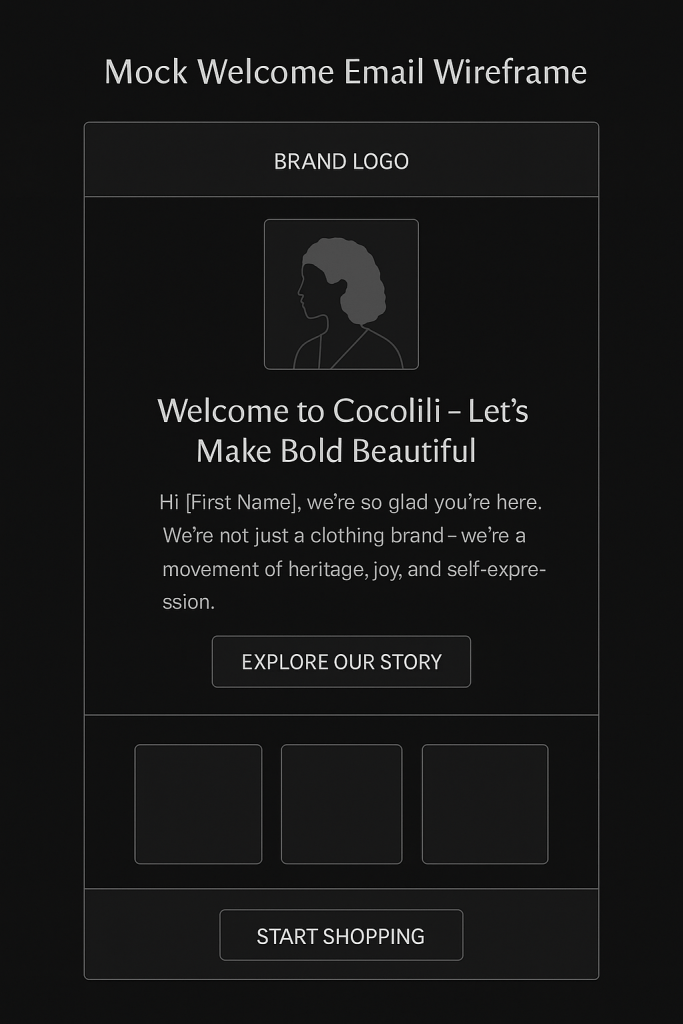
Here’s an example email I designed in Figma for a lifestyle brand:

Subject Line:
“Welcome to Cocolili – Let’s Make Bold Beautiful”
[Brand Logo]
[Hero Image: Bold woman in sleepwear]
[Welcome Text Block]
→ “Hi [First Name], we’re so glad you’re here.”
→ “We’re not just a clothing brand—we’re a movement of heritage, joy, and self-expression.”
[CTA Button: “Explore Our Story”]
[Divider]
[Product Teaser Grid – 3 top items]
[CTA Button: “Start Shopping”]
[CTA Button: “Explore Our Story”]
[Divider]
[Product Teaser Grid – 3 top items]
[CTA Button: “Start Shopping”]
Built with:
Mailchimp Automation Trigger + Shopify Integration
Responsive layout tested across Gmail, Apple Mail, Outlook
Tips from My Campaign Experience
- Use name merge tags (Hi Jasmine!) to increase personal connection
- Avoid long paragraphs—aim for scannable copy
- Test CTA placement: Try top vs. bottom button
- Add preview text like “A surprise inside just for you” to boost opens
Scaling the Series: Welcome Flow Strategy
Your welcome email shouldn’t be a one-and-done. I usually recommend a 3-part series:
| Timing | Content | |
|---|---|---|
| 1 | Immediately | Brand intro + CTA |
| 2 | Day 2 | Social proof + product benefits |
| 3 | Day 5 | Bestsellers or blog post + shop CTA |
Bonus tip: Add a review email 30 days later or a *“How’s it going?” feedback loop.
What I’ve Achieved
For one lifestyle client, implementing a fresh welcome flow led to:
- Open Rate: 52%
- Click Rate: 8.5%
- First-purchase conversions from email within 7 days
(I can show a screenshot on request – check the “Projects” section of my portfolio.)
Final Thoughts
Welcome emails work when they combine smart UX, authentic tone, and data-informed strategy. They’re not just an introduction, they’re your conversion gateway.
Want to see more?
Check out my blog on Email Automation Flows That Convert or explore my live Welcome Email Design in the Portfolio tab.
business digital-marketing email email-marketing keyword-research marketing organic-traffic SEO
Read More
SEO Case Study: Optimising Skylight Lighting Blog for Organic Growth
This SEO case study showcases how I optimised an underperforming blog for Fritz Fryer Lighting by combining keyword strategy, metadata, and UX layout improvements. Through targeted keyword research, on-page SEO fixes, internal linking, and accessibility enhancements, I transformed a visually rich but invisible blog into a high-ranking, conversion-driven asset. The result? A 38% increase in…

A/B Testing for Email: What to Test & How to Win
Unlock the power of data‑driven decisions with A/B testing in email marketing. In this post, discover which elements from subject lines to CTA buttons and layout blocks you should test, how to set up meaningful experiments in Campaign Monitor, and how to interpret results for continuous wins in open rates, clicks, and conversions.
The Anatomy of a High-Performing Promotional Email
Ready to turn browsers into buyers? In this post, I’ll break down the anatomy of a high-performing promotional sale email, designed to grab attention, drive urgency, and boost conversions. From compelling headlines to strategic product placement, discover how to design sale emails that not only look great but sell smarter.
 Jasmine